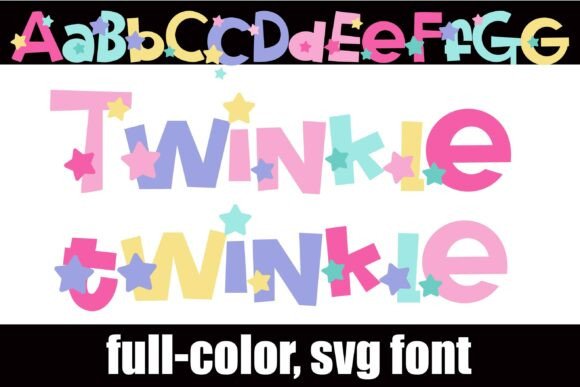
Twinkle Twinkle: A Whimsical Full-Color Font That Sparkles in Design
If you've ever wished for a font that feels like a handmade greeting card, a storybook illustration, or a child’s birthday banner—Twinkle Twinkle delivers just that. More than just letters on a screen, this full-color SVG font brings instant charm, personality, and visual delight to any project. It’s not merely decorative; it’s functional, flexible, and thoughtfully engineered for creators who value both aesthetics and practicality.
What Makes Twinkle Twinkle Stand Out?
Twinkle Twinkle is a whimsical, craft-inspired font rendered in soft pastel tones—think mint greens, blush pinks, buttery yellows, and sky blues—with tiny stars scattered throughout each glyph. Unlike traditional fonts where color is applied after typing, Twinkle Twinkle embeds color directly into the letterforms using OpenType’s SVG color font technology. Each character is a miniature illustration: playful, cohesive, and intentionally joyful.
One of its most delightful features is the alt case—a secondary set of glyphs offering alternate colors for every letter. These aren’t random swaps; they’re harmonized variations designed to work together. You can access them easily through your system’s glyph panel (like macOS Font Book) or Silhouette Studio’s glyph map—no extra downloads or plugins required.
How Does It Work—and Where Does It Shine?
Installing Twinkle Twinkle is as simple as installing any .otf font: drag into Font Book (Mac), use your preferred font manager, or install via Control Panel (Windows). Once installed, it appears in your font menu like any other typeface—though with an important caveat: color won’t appear in preview windows, even in compatible software. That’s normal. The magic happens only when you type and see the letters render in full color on your canvas.
Here’s where compatibility matters:
- Adobe Creative Cloud (Illustrator, Photoshop, InDesign) supports SVG color fonts natively—just select the font and start typing.
- Silhouette Studio (Designer Edition and above) renders Twinkle Twinkle in full color and lets you manipulate individual glyphs with precision.
- Inkscape (v1.1+) and QuarkXPress also support SVG fonts—ideal for vector-based print and digital layouts.
Keep in mind: programs without SVG support (like older versions of Microsoft Word or basic web builders) will display the font in black or default grayscale. That’s not a flaw—it’s how the technology works. If your workflow relies heavily on such tools, consider using Twinkle Twinkle for final assets (logos, social graphics, packaging mockups) rather than drafting stages.
Who Benefits Most from Twinkle Twinkle?
This isn’t just a “fun font” for hobbyists. Its thoughtful design serves real needs across multiple roles:
- Small business owners crafting Instagram posts, product labels, or seasonal promotions—especially in niches like baby goods, stationery, wellness, or handmade crafts.
- Teachers and educators designing classroom posters, reading charts, or digital learning materials where warmth and engagement matter.
- Wedding and event designers building invitations, signage, and digital save-the-dates that feel personal and hand-crafted.
- Content creators producing YouTube thumbnails, Canva templates, or Pinterest pins where visual differentiation boosts click-through rates.
- SVG cutters and crafters using Silhouette or Cricut machines—Twinkle Twinkle scales infinitely without pixelation, making it perfect for layered vinyl projects or intricate paper cuts.
Real-World Uses You Can Try Today
Need inspiration? Here are practical, tested applications:
- Custom Tote Bag Designs: Type a short phrase (“Hello Sunshine” or “Little Dreamer”) in Twinkle Twinkle, convert to outlines in Illustrator, then send to your printer or heat press. The pastel palette pairs beautifully with natural fabrics like canvas or linen.
- Print-on-Demand Greeting Cards: Combine Twinkle Twinkle with subtle watercolor backgrounds. Its built-in stars eliminate the need for separate star graphics—saving time and ensuring perfect alignment.
- Brand Submarks & Social Icons: Use a single letter (like “T” or “W”) as a standalone logo element. The alt-case colors let you match it precisely to your brand palette—even if your primary logo uses flat vectors.
- Digital Planners & Printable Kits: In Canva or Affinity Designer, layer Twinkle Twinkle headers over neutral grids. Its light contrast ensures readability while adding gentle visual rhythm.
Strengths—and Honest Considerations
Why creators love Twinkle Twinkle:
- Vector-based scalability: No blurriness at billboard size—or on a tiny enamel pin.
- Zero extra assets needed: Stars, shading, and color gradients are baked in—not layered separately.
- Effortless consistency: Every “A”, “B”, or “star-dot” matches tonally, so no manual tweaking to harmonize hues.
- Emotional resonance: Pastels + stars = instant warmth. Ideal for audiences seeking comfort, nostalgia, or lightheartedness.
Things to keep in mind:
- Not web-font ready: SVG color fonts aren’t supported in CSS
@font-faceyet. For websites, use Twinkle Twinkle in exported graphics (SVG/PNG), not live text. - Editing flexibility differs: You can’t recolor individual letters *within* the font file—but you can copy/paste glyphs into vector editors and adjust fills manually if needed.
- File size is slightly larger than standard OTFs, due to embedded color data—but negligible for typical design files.
Is Twinkle Twinkle Right for Your Next Project?
Ask yourself:
- Does your audience respond well to gentle, inviting visuals—not stark minimalism?
- Are you working in a compatible program (Adobe, Silhouette, Inkscape, Quark)?
- Do you value time savings over granular typographic control (e.g., kerning adjustments, ligatures)?
- Is your output primarily visual—social graphics, merch, print, or physical crafts—rather than long-form documents or code-heavy platforms?
If you answered “yes” to most of those, Twinkle Twinkle isn’t just appropriate—it’s a smart, expressive shortcut. It won’t replace your serif or sans-serif workhorses, but it adds a distinct voice to your toolkit: one that whispers “handmade,” “thoughtful,” and “joyfully intentional.”
Ultimately, Twinkle Twinkle succeeds because it understands that typography isn’t just about legibility—it’s about feeling. Whether you're designing a nursery wall quote or a boutique’s holiday campaign, this font doesn’t just say words. It sets a mood. It invites attention. And sometimes, especially in a crowded digital world, that tiny spark of whimsy is exactly what makes your message memorable.